Blog
What do Skill scanners catch without an LLM? A small, reproducible test (part 1)
By Rajeew Patabendi, Director, Cloud Security Architecture. A personal project, built on my own time with public information. Views are my own.
A Skill is instructions plus scripts that your AI agent follows with your permissions, so installing one is closer to installing software than to reading a document. Open-source scanners for Skills now exist. I wanted to know what a first pass with them actually covers, so I built a small test and made it reproducible.
This is part 1: the static, key-free baseline, which is what you get when no model access is allowed. Part 2 will add an LLM judge running on a local model, the setup a regulated team can actually run on-premises.
The test
- 18 Skills with one planted flaw each, two for each of nine rule families (network calls, shell execution, runtime installs, obfuscation, credential access, file access outside scope, description that doesn’t match behaviour, hidden instructions, known-vulnerable dependencies), plus 6 harmless controls. Some controls legitimately use the network or run a command, to measure false alarms.
- Two scanners: Cisco AI Defense Skill Scanner 2.3.0 and NVIDIA SkillSpector v2.13.0. Both are open source (Apache-2.0). I did not run Snyk Agent Scan: it needs a Snyk token and sends Skill content to Snyk’s API.
- Static analysis only. No LLM review stage, no VirusTotal, no cloud analyzers, no API keys. Cisco’s README says every setup it recommends includes its LLM judge, and that rules alone catch only about 8% of its own held-out set of malicious Skills, so this is deliberately the key-free baseline, not each tool at its best.
- Isolation: every scan ran in its own locked-down Docker container (non-root, read-only filesystem, no capabilities, sample folder mounted read-only). The network was off, except for the two configurations where I turned on the online OSV.dev dependency check.
- 22 of the 24 samples were written before any scanner was installed; the last two (known-vulnerable pinned dependencies) were added after a first run to exercise the online dependency check, and every scan was then re-run on the full set. No sample was tuned to a tool’s output. All of them are inert.
What came out
| Config | Planted flaws caught | Harmless controls flagged |
|---|---|---|
| Cisco, default | 7 / 18 | 1 / 6 |
| Cisco, + behavioral analyzer | 7 / 18 | 1 / 6 |
| Cisco, strict policy | 7 / 18 | 2 / 6 |
| Cisco, + behavioral + OSV.dev check (online) | 9 / 18 | 1 / 6 |
| SkillSpector, offline | 13 / 18 | 2 / 6 |
| SkillSpector, + OSV.dev check (online) | 13 / 18 | 2 / 6 |
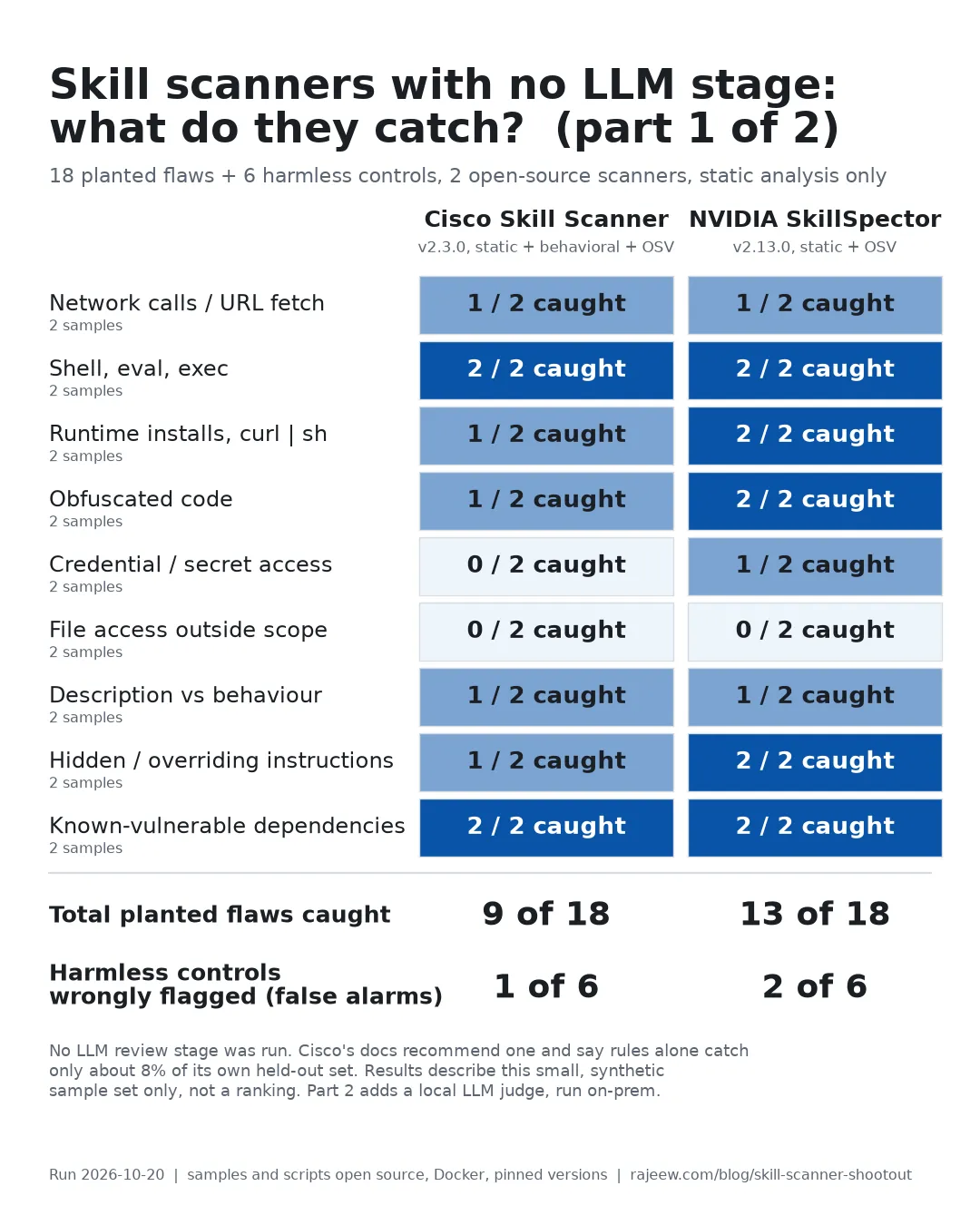
By rule family, with each tool at its most capable key-free setting (both with the online dependency check on):
| Rule family | Cisco | SkillSpector |
|---|---|---|
| Network calls and URL fetches | 1 / 2 | 1 / 2 |
| Shell execution, eval/exec | 2 / 2 | 2 / 2 |
| Runtime installs, curl-to-shell | 1 / 2 | 2 / 2 |
| Obfuscated code | 1 / 2 | 2 / 2 |
| Credential or secret access | 0 / 2 | 1 / 2 |
| File access outside the Skill’s scope | 0 / 2 | 0 / 2 |
| Description doesn’t match behaviour | 1 / 2 | 1 / 2 |
| Hidden or overriding instructions | 1 / 2 | 2 / 2 |
| Known-vulnerable pinned dependencies | 2 / 2 | 2 / 2 |
These numbers describe this sample set only. They are not a ranking of the tools.
What I’d take from it
- Both tools missed the same five flaws: instructions to fetch and follow remote rules written in plain prose, reading a cloud credentials file, writing to a shell startup file, a path-traversal read, and a Skill that says it is read-only but deletes a folder. A scan with no findings does not cover these, so a human review has to.
- Four more were caught by SkillSpector but not by Cisco’s static rules: harvesting secrets from environment variables, an instruction to silently send the conversation to an outside address, obfuscation built with
chr()codes, and a runtimepip install. Cisco’s recommended LLM judge was not run here, so this says little about Cisco’s best configuration. - Dependency checks need to be on and, for Cisco, online. Cisco found the two known-vulnerable pinned packages only with
--use-osv, which queries OSV.dev. SkillSpector flagged them in both modes, because its offline fallback list covers those versions, and reported more advisories online. If you vet Skills in an offline environment, check what your scanner does without the network. - False alarms were few but instructive. Both tools warned about a benign weather Skill that makes one documented request with the user’s own key. That warning is defensible, and a human has to decide. SkillSpector also flagged a
git statuscall that passes its arguments as a list instead of through a shell. - Fix the findings, not the score. Pin dependencies, keep Skills out of credential paths, and read what a Skill does against what it says it does. A scanner is the first pass.
Method, limits and how to rerun it
Everything is in the open: the sample Skills, the answer key, the Docker setup with pinned images and versions, the raw scanner output, and the scripts that produce the results page. Rerun it with one command, or explore every result sample by sample, including a view grouped by OWASP, MITRE ATLAS, CWE and ATT&CK items.
- Repository: github.com/rajeews/skill-scanner-shootout
- Results explorer: rajeew.com/skill-scanner-shootout
Limits: a small, synthetic, author-written sample set; static analysis only; default or near-default settings; tool versions change quickly. A research paper cautions that scanner verdicts on real marketplaces can be inflated (arXiv:2603.16572). Framework tags are my mapping of rule families to items, not an official crosswalk.
If you maintain one of these tools, or think a result is wrong or a tool was run in a way that doesn’t reflect its intended use, open an issue on the repository. I will rerun with your recommended configuration and publish the change, including what was wrong.
← Back to all posts